Viewing Reports
Viewing Reports
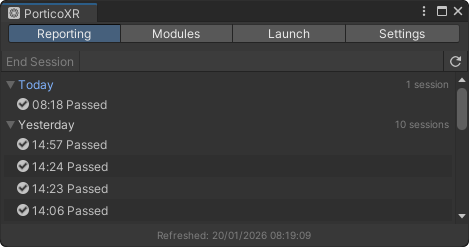
You can view the reports that your app is generating on the Portico LMS directly from Unity:
- Navigate to the menu bar and select PorticoXR > View Reports…
- Wait for the window to refresh - it will automatically retrieve all reports generated for your project.
💡 You can refresh the reports list at any time by clicking the button at the top of the reports window.
📃 Report List
- Click the session you want to review
- A shareable link will open in your default browser
- Review the data - the report displays:
- Completion status for each statement
- Session metadata and timing information
🔧 Session Management
- Session completion: Sending a completion statement automatically closes the current session and report.
- New sessions: When you join again after completing a session, a new session is created automatically.
- Continuing sessions: If the current session is not yet completed, you will rejoin the existing session.
💡 To manually end a session, from the reports window, click ‘End Session’.