Activities
Activities are discrete tasks or steps within a process that can be tracked and reported on. Activities typically represent objectives or milestones that a player or user is expected to complete. These are implemented in Unity as assets, which are nested within a module, allowing for structured tracking of user progress that includes results.
📝 Reporting Activity Completion
To report that an activity has been completed, you can send a statement using the reporting API. Here is a basic example in C#:
using PorticoXR.Reporting;
using PorticoXR.Reporting.Statements;

// 'activity' is a reference to your Activity asset
var result = new Result { Completion = true, Success = true };
var statement = Statement.CreateForActivity(activity, result);
PorticoReporting.Send(statement);
This code creates and sends a statement indicating that the specified activity has been completed successfully.
💡 Your module is also an ‘activity’ so you can use this method to send completion statements for the session
⚡ Using Unity Components
If you prefer to work with Unity components, the ActivityHelper component simplifies the process of building and sending activity statements. Attach the ActivityHelper to a GameObject and configure it in the Unity Inspector. You can then send a statement by calling the Send method either by code or using UnityEvents.
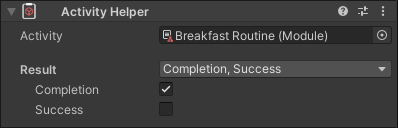
You can find this component under PorticoXR > Reporting > Activity Helper in the Unity component menu.